


Your shopping cart is empty!
Categories
- Batteries
-
Capacitors
+-
- Non Polarized +-
- Polarized +-
- SMD Multilayer Ceramic Capacitors 0201 (0603 Metric)
- SMD Multilayer Ceramic Capacitors 0402 (1005 Metric)
- SMD Multilayer Ceramic Capacitors 0603 (1608 Metric)
- SMD Multilayer Ceramic Capacitors 0805 (2012 Metric)
- SMD Multilayer Ceramic Capacitors 1206 (3216 Metric)
- SMD Multilayer Ceramic Capacitors 1210 (3225 Metric)
- SMD Tantalum Capacitors Case A 3216
- SMD Tantalum Capacitors Case B 3528
- SMD Tantalum Capacitors Case C 6032
- SMD Tantalum Capacitors Case D 7343
- Tantalum Capacitor
- Trimmer Capacitors
- Car Accessories +-
-
Connectors
+-
- Ethernet Cables And Connectors
- Audio Mono and Stereo Connectors
- Banana Connectors
- Barrier Terminal Block
- BLOCK Connectors PCB Type
- Cannon Connectors
- Coaxial Connectors
- Coaxial Connectors (SMA-SMB-SMC)
- Crimp Terminal Connectors
- Crimp Terminal Connectors Ring Type
- Crocodile Connectors
- D-SUB Connectors
- DC Connectors
- Dupont TJC Connectors
- IDC Connectors 2.0mm Pitch
- IDC Connectors 2.54mm Pitch
- Nylon Insulated Cord End Terminals
- Test Grabber Hook Clip Test Probe
- USB Connectors
- Wire to Board Connectors
- Wire to Wire Connectors
- Wire to Wire SM Connectors
- Cooling Fans
- Crystal Oscillators
- Diodes +-
- Electronics Project Boxes
- Fuses and Breaker +-
- Gadgets and Gifts +-
- Hardware Nuts Bolts Washers +-
- Heat Shrink Sleeves
- Heat Sink
- IC Base and Headers +-
- ICs +-
- Inductors +-
- Kits +-
- Knobs
- LCDs
- LIGHTS +-
- Magnets
- MicroControllers +-
- Motors +-
- PCBs +-
-
Potentiometers
+-
- Gear Tuning Potentiometer
- SMD Tuning Potentiometer
- 3006P Multiturn Precision Potentiometer
- 3296 Multiturn Precision Potentiometer
- 3362 Trimming Potentiometer
- 3386 Trimming Potentiometer
- WH06-1 Potentiometer Variable Resistor
- 3590 Wirewound Potentiometer
- WH06-2 Potentiometer Variable Resistor
- WH112A-2 Potentiometer Variable Resistor
- Knob Big Potentiometer Variable Resistor
- WH148-1A Potentiometer Variable Resistor
- WH148-1B Potentiometer Variable Resistor
- Semi-Fixed (SR083) Potentiometer Variable Resistor
- WTH118-1A Wire Wound Potentiometer Variable Resistor
- Slide Potentiometer Variable Resistor
- Shaft Potentiometer Variable Resistor
- Trimmer Resistors
- WF-905CL Potentiometer Variable Resistor
- Power Supply +-
- Relays +-
-
Resistors
+-
- SMD Resistors 0201 0603 Metric .05W 1%
- SMD Resistors 0402 1005 Metric .06W
- SMD Resistors 0603 1608 Metric .1W 1%
- SMD Resistors 0603 1608 Metric .1W 5%
- SMD Resistors 0805 2012 Metric .125W 1%
- SMD Resistors 0805 2012 Metric .125W 5%
- SMD Resistors 1206 3216 Metric .25W
- SMD Resistors 1210 3225 Metric .33W
- SMD Resistors 2010 5025 Metric .75W 1%
- SMD Resistors 2010 5025 Metric .75W 5%
- SMD Resistors 2512 6332 Metric 1W 5%
- DIP Resistor Network
- SIP Resistor Network
- 1/8W (+-0.1%) Carbon Film Fixed Resistor
- 1/8W (+- 1%) Carbon Film Fixed Resistor
- 1/8W (+- 5%) Carbon Film Fixed Resistor
- .25w (+-1%) Carbon Film Fixed Resistor
- .25w (+-5%) Carbon Film Fixed Resistor
- 1/2W (+- 5%) Carbon Film Fixed Resistor
- 1W (+- 5%) Carbon Film Fixed Resistor
- 2W (+- 5%) Carbon Film Fixed Resistor
- 5W (+- 5%) Fix Wirewound Cement Resistor
- 10W (+- 5%) Fix Wirewound Cement Resistor
- Sensors +-
- Smart Boards +-
- Speakers and Buzzers
- Switches +-
- Thermistors +-
- Tools +-
- Transistors +-
- Varistors
- Voltage Regulators +-
- Wires and Cables +-
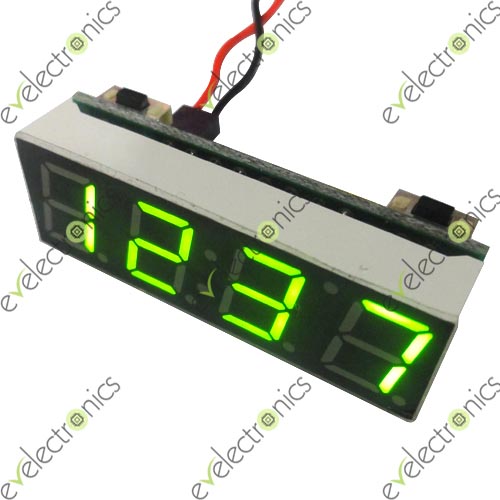
12V Digital Multifunction Clock Thermometer Voltmeter Red 40mm
Brand: Unbranded
Rs. SKU: 7614
Availability: In Stock
InStock
Rs. SKU: 7614
Availability: In Stock
Rs.1,500.0
12V Digital Multifunction Clock Thermometer Voltmeter Red
Specifications:
This module has three functions on itself, clock, thermometer, voltmeter.
There are four display modules: time only, temperature only, voltage only, time and temperature and
voltage display in turns.
It has temperature hand calib function, setting arrange is -5~5℃
It has backup battery, so it will goes on counting when the power off.
Small size: 40.0mm*13mm*13mm
Parameter:
Input voltage is 5-15V, notice if you want to use the voltmeter function the input voltage should be
Higher than 6V
The voltmeter range is 6-15V, Deviation is±0.1V
Temperature range is -9℃~60℃
Function and use:
First, adjust the time, date, year, voltage error, temperature error term is defined cycle, alternating intervals
Under non-setting state, press the left button of adjustment time (note in the middle of the colon is bright),
At this time "minute" starts flashing, increase press right, adjust the range 00 to 59. After a good tune, "minute",
Press the left button, then the "hour" starts flashing, increase press right, adjust the range 00 to 23.
tuned "hour", then press the left into the adjustment date (note in the middle of the colon is off), then "day" starts flashing, press right to increase adjustment range 1-31.
tuned "day", then press the left button, then the "month" starts flashing, press right to increase adjustment range 1-12.
After adjusting the date, then the left, then "year" starts flashing, increase press right, adjust the range 2012-2049.
adjust the "year", then press the left button, go to show the error voltage calibration function [x.xU], the unit is 0.1V, a positive number indicates an increase, a negative number indicates decrease.
Then press the left button, enter the temperature error calibration settings [Ac: xx], xx on behalf of the correction value, increased by right, a positive number indicates an increase, a negative number indicates decrease in degrees.
Press the left, into the cycle defined function dd option status display items, press the right to change the value: (dd: 0) time + temperature + voltage, (dd: 1) time + voltage, (dd: 2 ) time + temperature, (dd: 3) Temperature + voltage. Press the left button, the display alternately into circulation interval dF option, press right to change the value, the greater the value the longer the interval.
Finally press the left button to save all settings value and return to normal display.
Buy Electronics parts through EVE-eVision Electronics Pakistan, Pakistan's first online electronics store.
Specifications:
This module has three functions on itself, clock, thermometer, voltmeter.
There are four display modules: time only, temperature only, voltage only, time and temperature and
voltage display in turns.
It has temperature hand calib function, setting arrange is -5~5℃
It has backup battery, so it will goes on counting when the power off.
Small size: 40.0mm*13mm*13mm
Parameter:
Input voltage is 5-15V, notice if you want to use the voltmeter function the input voltage should be
Higher than 6V
The voltmeter range is 6-15V, Deviation is±0.1V
Temperature range is -9℃~60℃
Function and use:
First, adjust the time, date, year, voltage error, temperature error term is defined cycle, alternating intervals
Under non-setting state, press the left button of adjustment time (note in the middle of the colon is bright),
At this time "minute" starts flashing, increase press right, adjust the range 00 to 59. After a good tune, "minute",
Press the left button, then the "hour" starts flashing, increase press right, adjust the range 00 to 23.
tuned "hour", then press the left into the adjustment date (note in the middle of the colon is off), then "day" starts flashing, press right to increase adjustment range 1-31.
tuned "day", then press the left button, then the "month" starts flashing, press right to increase adjustment range 1-12.
After adjusting the date, then the left, then "year" starts flashing, increase press right, adjust the range 2012-2049.
adjust the "year", then press the left button, go to show the error voltage calibration function [x.xU], the unit is 0.1V, a positive number indicates an increase, a negative number indicates decrease.
Then press the left button, enter the temperature error calibration settings [Ac: xx], xx on behalf of the correction value, increased by right, a positive number indicates an increase, a negative number indicates decrease in degrees.
Press the left, into the cycle defined function dd option status display items, press the right to change the value: (dd: 0) time + temperature + voltage, (dd: 1) time + voltage, (dd: 2 ) time + temperature, (dd: 3) Temperature + voltage. Press the left button, the display alternately into circulation interval dF option, press right to change the value, the greater the value the longer the interval.
Finally press the left button to save all settings value and return to normal display.
Buy Electronics parts through EVE-eVision Electronics Pakistan, Pakistan's first online electronics store.